A few days ago, my lower back hurt. The pain was pulling into the upper part of my thigh, and my neck was tense too.
Normally, this would have started a familiar chain of behavior.
I would open Google. I would search something like: exercises for lower back pain and thigh pain. Then I would open a few websites, compare explanations, look for images, check whether the advice sounded relevant, maybe watch a video, and finally try to assemble a small routine for myself.
That flow used to feel normal.
This time, I did something different.
I opened Gemini and described the situation in plain language: what hurt, where the pain was going, and what kind of exercises might help with tension. The assistant gave me a short explanation, a set of recommended exercises, step-by-step instructions, timing, and a few safety notes.
Then I asked it, in the same thread, to generate images for the exercises it had just recommended.
A minute later, I had something closer to a personal instruction sheet: four exercises, visual guidance, descriptions, timing, and highlighted areas showing what to pay attention to.
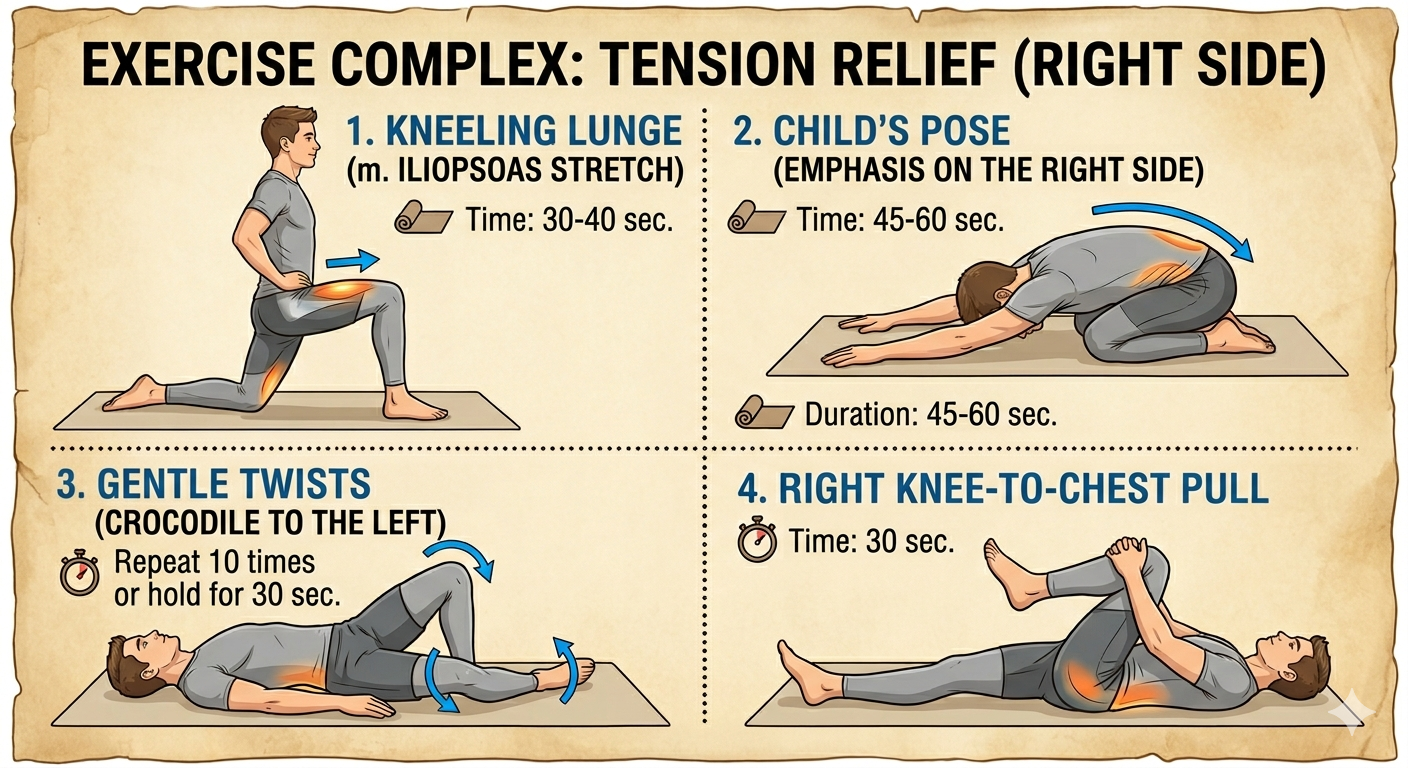
Example of the new behavior: instead of searching across websites for exercise photos and instructions, the assistant generated a visual routine in the same thread as the original question.
This is not a medical recommendation. It is a UX observation.
The important part is not whether that particular answer was perfect. The important part is how different the behavior felt.
I did not search for information first and then manually turn it into action. I described a problem and received something closer to a usable workflow.
That is a big shift.
From search result to ready-to-use instruction
For the last 20 years, the default pattern looked like this:
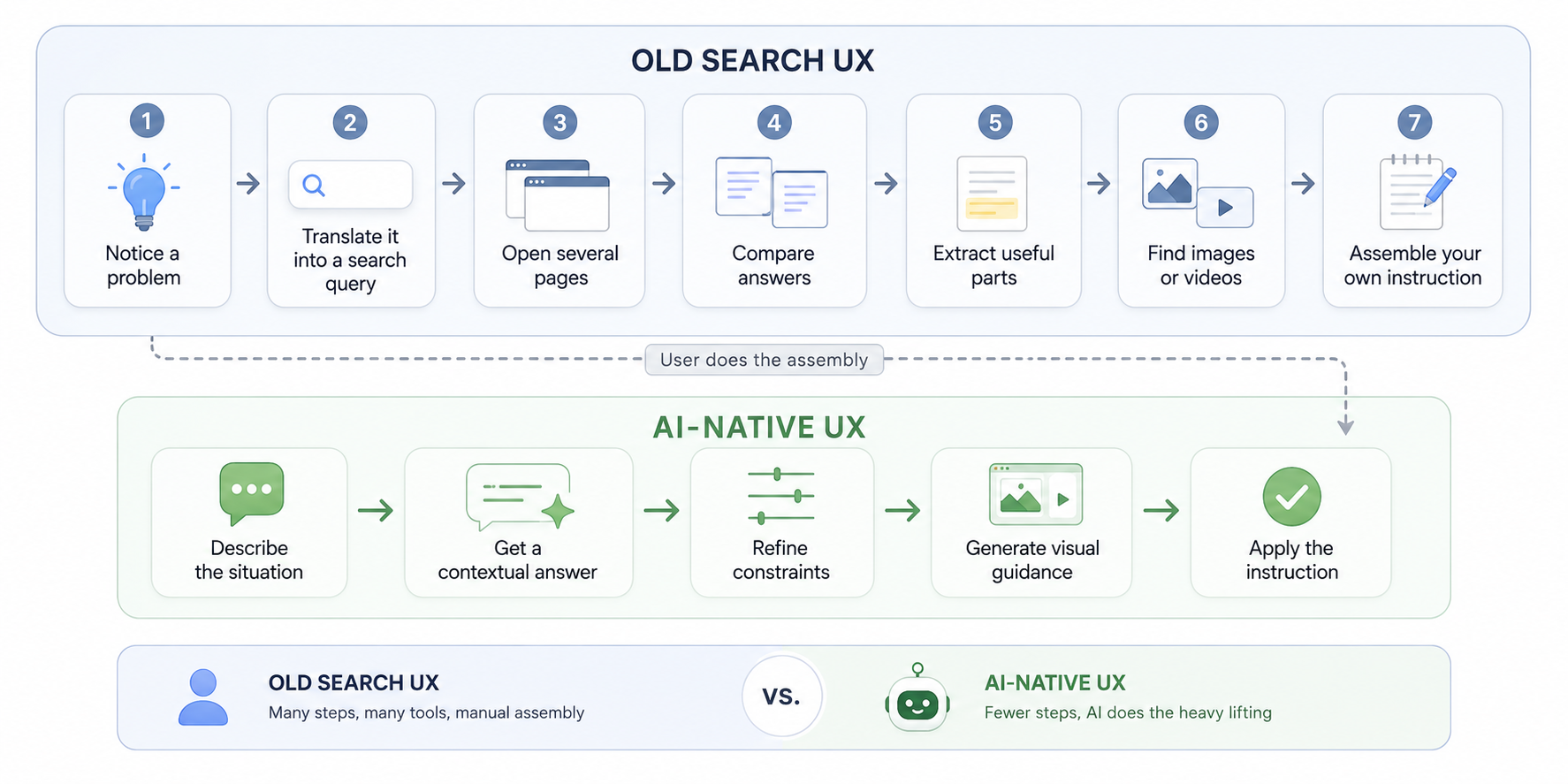
The burden was on the user.
The user had to understand the problem well enough to search for it. The user had to know which result looked trustworthy. The user had to connect text, images, and instructions from different sources. The user had to create the final "how do I apply this?" layer alone.
AI assistants compress that flow.
The interface has changed from a list of pages to a working conversation.
That sounds small until you feel it in a real moment. When you are tired, distracted, or dealing with a practical problem, saving 10 or 20 minutes is not just convenience. It changes whether you act at all.
The new user behavior: ask, refine, generate, apply
The old web trained us to search.
AI tools are training us to compose outcomes.
When people use assistants well, they do not just ask, "What is the answer?" They keep going:
- "Explain this in simpler terms."
- "Give me steps."
- "Adapt it to my situation."
- "Make a checklist."
- "Create an image."
- "Turn this into a document."
- "Save this in the format I need."
This is not just faster search. It is a different mental model.
The user is no longer only consuming information. The user is shaping an output.
That is why the biggest change is not that AI can answer questions. Search engines could already help us find answers. The bigger change is that AI can help us move from question to application inside the same flow.
Information becomes instruction. Instruction becomes artifact. Artifact becomes action.
The same shift is happening in work
This article is another example.
I am not sitting with a blank document and trying to write a polished post from scratch. I am using Worklayer, my own product, as the workspace around the work.
I turned on dictation on my MacBook and spoke the raw idea out loud. The idea was messy, because spoken thinking is messy. I talked about the back pain example, how AI changes search behavior, why this matters, how Worklayer fits into the picture, and what the tradeoff is.
Then I sent that raw input to Codex inside a workspace that already knows my business context, tone of voice, templates, output folders, and writing rules.
That matters.
A generic AI chat can help write text. But serious work usually needs more than a chat response. It needs context, structure, naming conventions, output location, and a reason why the artifact exists.
In this case, the workflow is:
- I speak the raw thought.
- Worklayer provides the business context and workspace structure.
- Codex turns the raw input into a draft article.
- The article is saved into the right output folder.
- Future work can reference it instead of disappearing into chat history.
This is the same behavioral shift as the Gemini example, but in a business workflow.
I am not only asking an AI to "write an article." I am using an AI-native workspace to turn rough thought into a structured artifact.
Why this feels like the beginning, not the end
Mass-market AI tools are still young. In practical consumer behavior terms, this era is only a few years old.
That is easy to forget because the progress already feels normal. We quickly adapt to new speed. Something that looked impossible a year ago becomes expected. Something that saved 30 minutes last month becomes part of the baseline.
But if this is the early version, the long-term change is much larger.
In five or ten years, people may look back at the old search workflow the way we now look at printed maps. Useful for its time, but clearly not the final interface for finding your way.
The people and companies who adapt will have an advantage.
Not because they "use AI." That phrase is already too broad to mean much.
They will have an advantage because they learn how to think, work, and produce with AI in the loop. They will know how to ask better questions, provide better context, evaluate outputs, create artifacts, and build repeatable workflows.
The winning skill is not prompting alone. It is judgment plus workflow design.
The tradeoff: cognitive load is rising
There is another side to this.
AI reduces friction, but it also increases volume.
We can generate more documents, more images, more plans, more ideas, more variants, more research summaries, and more drafts than ever before. The speed of production has exploded.
Our brains have not evolved at the same speed.
Anyone who uses these tools actively understands the feeling. You can create five useful outputs in the time it used to take to create one. But then you still need to read them, compare them, judge them, edit them, connect them, and decide what matters.
The bottleneck moves.
Before, the bottleneck was often access to information or production capacity. Now the bottleneck is attention, judgment, and context management.
That is the price we pay for this new leverage.
AI can make work faster, but faster work is not automatically better work. Without structure, it can become noise at a higher speed.
What this means for products
If user behavior is moving from search to outcome creation, products need to change too.
The next generation of tools will not only help users find things. They will help users turn intent into usable outputs.
That means products need to care about:
- context, not just input
- workflows, not just features
- artifacts, not just messages
- memory, not just sessions
- judgment, not just generation
This is the reason I am building Worklayer the way I am building it.
The future is not one giant chat box that replaces every tool. That is too simplistic.
The future is structured workspaces where AI can operate with the right context, follow the right templates, use the right files, and save outputs where they can be reused.
A chat is a good interface for thinking.
A workspace is where work becomes durable.
The real change
The real change is not that AI gives us faster answers.
The real change is that the distance between having a question and having something usable is shrinking.
For a back pain question, that might mean going from symptoms to a visual exercise routine in a minute.
For a founder, it might mean going from a voice note to a structured article.
For a product manager, it might mean going from scattered context to a PRD, user story, release plan, or stakeholder update.
The pattern is the same:
Intent becomes context. Context becomes output. Output becomes action.
That is the behavioral shift worth paying attention to.
And we are still at the beginning.
Ready to ship faster?
Download Worklayer for macOS and get early access to the AI workspace built for product managers.
Download Worklayer